Showing posts with label Tech. Show all posts

Saturday, January 14, 2012

Do more with your iPad

Came across two amazing apps for iPad which have filled the gap I was looking for and taken my iPad experience to a new level. The first one being Blogsy- the blogging app. Unlike its counterparts, it offers rich viewing along with raw HTML. Also, adding pictures, videos just got easy with it. Within two clicks you can select the source of media and the location to store it. It is very easy to drag and position the image on the screen.

You can add multiple accounts, create local copies of the posts etc. But the great thing about the app is the easy access to your blog and editing comfort.

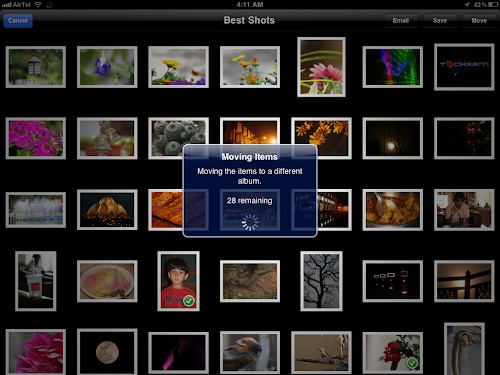
The second app is the web albums. It is a Picasa web album viewer, uploader and downloader. And what a UI, I am overwhelmed with the work these guys have done. They have replicated the pictures app on the iPad along with the pinch to go back, swipe to next gestures. Click on the photo and you can see all the camera EXIF data. Add captions to the photos, upload new ones, even move pictures between your web albums - wow! It even gives you option to cache entire albums locally, and adjust the cache limit as per your wish.

Web albums 1

While still amazed with the above two apps, I came across a photo editing app - Photogene for iPad. It features more than 2 dozens of editing tools which are very effective. This app definitely has the capability to shift the photo editing platform from laptop to iPad.

Wednesday, November 9, 2011

To Steve Jobs

I still remember May 3rd, 2008, the day I got my first Apple product - the white Macbook. It was an adorable and well polished creation. Just the hardware itself had spelled me enough to love this white glistening machine, with a glowing Apple sign behind the screen. Being extremely light weight, it was a pleasure to work while holding it in lap. Unlike most of the other laptops, there were no exhaust openings at the bottom or sides and it was absolutely silent in operation. I recently came to know that Jobs had learnt this from his father - even the parts which are not visible should be well finished. 

The battery backup was 5 to 6 hours - travel all day long without worry; wake up from sleep was unbelievably fast - open the lid and it was on. Browsing through the Apple website for help, somewhere it said "Mac might appear very unconventional initially but in a week you would feel as if you have been together for ages". I am glad that Apple has kept all its promises as this one. The bond has grown stronger everyday. The operating system and applications have been packaged to give a soothing experience. It came with all the essential softwares with easy to configure steps for which I would have to spend whole night on a new PC. I rarely had encounters with a waiting cursor or any virus. The best part was that it was well consistent and organized throughout the OS and all applications. Help is actually helpful as it is easily available and most of the things are accessible in not more than a couple of clicks. It was a design marvel and a source of inspiration. It was only after working on it for sometime that I realized how much change I had undergone. I was learning to do things with perfection till the last bit of it. I had always hated making documents and presentations - found them really boring, in MS-Office; organizing my folders and desktops was a tedious job. I tried iWork for one day and now I was loving every document, because of its limited and yet equally powerful controls.

During my internship in Sweden, I came across Steve Jobs' commencement speech at Stanford. I liked his passion for doing something new and good. By that time iPhone 1st generation was already launched and 3G was about to be launched in July. Around the end of June, I was browsing through the iPhone pages on Apple's site. I was already using an HTC P3300 Windows phone and I never really liked it except for its mp3 playing capability. I looked up used iPhones on Ebay/US and was fortunate to win one of the bids for ten thousand rupees. My first day with the phone was amazing. More about it : here. It was something beyond our imagination. With time, I moved to 3G, 3GS and now iPhone 4. Not a day has passed in last three years, when I have not adored it - consistency again. It has really simplified my life giving me more time to focus on real problems. Be it accessing my mail on the go or video chat on 3G or finding my way in any part of the world and of course the games, google, camera and iBooks, its much more worthier than any single handheld device can be.

Looking back, if there was one single person behind the technological revolution which made these possible, it was Steve Jobs. His contributions are countless. With Wozniak, he invented the first small computer, introduced the mouse, the amazing Mac, the multi-touch interfaces and various other things which make up today's Apple products. These in turn has inspired many other products which make our life easier. His insight into user experience was amazing. At the same time he was a true businessman who knew how to bring people together and make them work towards one big target. But more than anything he was a great visionary who paved the way for generations to come. He mentored many other companies which have contributed to many more technological revolutions. He laid down the foundation of a world where things would magically work, where a user would just relish the technology while the computer would understand his master and do all the work. Rest in peace Steve, the world will miss you.
  
The picture below, one of my favorites, shows him passionately holding the first Apple computer. The video below that from a 1983 Apple event where Steve is playing game with Bill Gates and others. The second video is a documentary on him - it has some really classic pics of him. Third one is an interview of Walter Isaacson who shares some of his pics and audio used in writing his biography.


Friday, August 13, 2010

3G is 3 times faster


BSNL 3G on my phone finally showed some signs of life. Praneeth got an Idea modem with Bsnl sim and I wanted to see if it can work in 3G mode on my phone. Only change I had to make was to change my APN to bsnlnet and not gprs3gnorth as specified on various online blogs. It not only worked in first shot, we were able to download some videos as well at a consistent 30KBps speed with 70KBps spikes now and then. To test the performance we downloaded the speed test app which showed a maximum download rate of 200kbps. This is cool. As claimed by Praneeth the connection is unlimited downloaded at Rs. 250 per month.
With EDGE I usually get 10KBps so 3G is definitely 3 times faster and it can download videos. .... Amazing !!
BlogBooster-The most productive way for mobile blogging. BlogBooster is a multi-service blog editor for iPhone, Android, WebOs and your desktop

Monday, June 7, 2010

AVR development on Mac OS X with XCODE


Are you an AVR fan who has recently migrated to Mac and disappointed by the lack of AVR support for Mac users? Specially if you have been working on CVAVR and AVRStudio for development, and now you realise that there is no such GUI available for Mac.
A closer look at the situation reveals that there is ample support and resources available for here which I will list one by one.

Alternative 1 :
Install VMware on Mac and run all your old windows programs without a glitch. The disadvantage is that running another OS like XP, more so if its Windows 7, consumes a lot of resources and your system performance goes down. Nevertheless, you can give it a try if you have a free/ trial copy of VMware, and of course XP.

Alternative 2 :
As we all know avr-gcc compilers are available for linux and Mac as well. So you can download and install them and start writing programs and burning them from Terminal command line. This might turn out to be a tedious task if you are new to command line. You are bound to falter once while changing fuse bits through command line and this results in killing your poor Atmel chip.

To burn fuses without burning the chip, there is a nice application available for Mac called the AVR Fuses . This application provides the same interface as your AVRStudio for changing fuses and programming your chip.


This GUI uses avrdude to program the fuses as well as the program memory. (I will explain installing that later). Just go to the preferences and set the right path to avrdude and the programmer port and it begins to work.

Note : If you plan to use a USB to serial converter like the one from prolific you need to install a PL2303 prolific mac driver which is readily available on the web.

Alternative 3 :
A similar but more useful app called the AVR Tools also has a built in serial terminal. So this eliminates the need for XTerm etc. The environment is slowly building up to give you a good experience. This app has a whole list of programmer support ranging form USBasp to the simple sercon mini programmers. Select the port form the dropdown list which is automatically populated depending on the available serial ports (USB to serial adapters, bluetooth serial ports etc.). This as well requires installing avr-gcc and avrdude. I would recommend AVR-Crosspack for installing the avr-gcc toolchains etc. To configure it rightly, please follow Lady Ada's tutorial . Please follow it step by step.


Alternative 4 :
Till now we haven't come across a native IDE for AVR development on Mac. We haven't yet explored the beauty of development on Mac. If you are not familiar with Xcode, its the native development environment for Mac. It has an amazing GUI. Yes, you are thinking in the right direction. We are about to use Xcode for AVR development. Please install and test AVR-CrossPack and configure it correctly before you proceed.
Xcode provides you option for creating project templates. A great person has created a nice AVR template for us. Download the template folder from the following link:

and copy the folder into the directory:

/Developer/Library/Xcode/Project Templates/Others/
or,

/Library/Application Support/Developer/Shared/Xcode/Project Templates/

Now run the Xcode and click open a new project. A template chooser like one of the following will appear depending on where you had copied the folder in the previous step.


Select the AVR project or the Atmega project. On the left pane you see firmware folder. Expand it and you will see 2-3 files including main.c and makefile. main.c is the file you need to edit and write your project in. After writing the code click on build and a hex file will be created in the project folder. From the Release dropdown list on top left, you can choose to flash the microcontroller if the write programmer and options are set in the makefile.

You can also edit this template to include some default things by opening the project file from the directory you copied in the first step. For example, I edited the template so as
1. to use particular serial port by default by editing the make file
AVRDUDE_PORT = /dev/cu.STK500-1-GenericSerial
2. to use a particular programmer type by editing the make file

AVRDUDE_PROGRAMMERID = stk500v2

3. I often use delay functions. So I made a delay.h header file and included it in main.


I made some more changes in the make file to write all the build files in a subdirectory of the project file to prevent it from unnecessary cluttering.

Later, I connected a bluetooth serial module to the programming port of my STK500 board and began flashing it wirelessly from my Mac. So now when I press the build button, it automatically compiles the code and burns it on the microcontroller wirelessly :P . Details about it in the next blog.


Hope you have a good AVR+Mac experience.

Tuesday, March 31, 2009

Steve Jobs at IITK !!


While I was busy working in my corner at TMRS lab at 11.30 pm yesterday, Shantanu enters the room and asks me for Nikhil Padhye's phone number.... why?
"He needs to welcome Mr.Steve who is coming tomorrow at 11 am".
"Who.. Steve Buckner ?? " said I.
"Nahi yaar ... I am forgetting his name...Steve...mmmm"
"Steve Jobs to nahi??", giggled we.
"Haan Steve Jobs".
"STEVE JOBS???? are you sure you are awake and its him?"
"Haan bhai Steve Jobs"
"Steve Jobs ...Apple wala?"
"Nahi nahi... IITK ka first mechanical deptt HOD"
Ahh... we took a deep sigh of relief while our heart beat count was already 5 count up.
Then he recalled its not Steve Jobs but Vijay Kumar Stokes who was coming to IITK and was visiting our lab.
Next morning we met the 70 year old young man who still had the spark of IITK alive in him. While Shantanu demonstrated him his classic nanosatellite ppt, we had some great conversations with him. First thing he stated was that he needed the most intelligent person in the lab to remind him at 1 o'clock to meet the director. No sooner had Shantanu started than he interrupted him, asking why is it called nanosatellite. He explained to him the standards for nomenclature and that the name has nothing to do witjh nanotechnology. This was followed by a small dicussion on the use of word nano and micro today. This time Amrit Sagar said like we have Tata NANO, we have a nanosatellite. "No, its not the same. Nano is the name of the car and not the category. You can name yourself Micro Srivastava but you can not categorise yourself as micro organism".
Very soon he was bored with the lengthy and irrelevant presentation and guided Shantanu on making the presentation precise as per the audience. He even went on to mark him fail on the poor quality of indentation and text justification. He said that one should first build the story that is to be narrated then add the relevant content into the presentation. If someone asks you the way to railway station, one should not go on telling him how to catch auto and where to get down and how to pay the driver. Too much of irrelevant details may make the audience miss the flow of talk.
In the middle he pointed out asking if the spelling of "Ahamadabad" was correct. "You are in IITK right, so at least use the spell check. I can easily make out there is something wrong from the two different sizes of Ahmedabad on the slide. While I was coming I saw three different speelings of students' gymkhana at the same place : Student Gymkhana, Student's Gymkhana and Students' Gymkhana." The next thing he pointed was the fancy style of bulleting and inappropriate eye catchy font which changed from 1 slide to other. He emphasized on quality control of things. He gave an example of marathon athlete; he is most tired at the end of the race but that is the time when he should cross the line with full enthusiasm. Quality should be maintained till the end before the result because it is then when it is going to be exposed to public. If everything was good but quality goes bad at the end due to tiredness all the efforts go in vain. So one should get refreshed just before the end for the show. He asked the team to do extensive testing of the components before launching the satellite.
Shubham feeling sleepy, popped up suddenly, "Sir its 1 o'clock."
"No its not, check your watch".
"Sir, I checked Shantanu's watch."
Amrit said it was 12:58 pm by his watch but it was 6 minutes fast. "How will you make satellite when can not keep your watches up to date". Amrit said, "Sir, but I know the right time now".
He remembered faces of people who met him last time. He remembered Nikhil but faintly. Nikhil promptly said, "The only difference is that I have grown older and you have grown younger". In the mean time Vyas Sir had arrived and we had a small photography session with him.

Thursday, March 26, 2009

AVR fuse programmer for MAC

Flashing MCUs or programming fuses in MAC doesn't have much GUI support except for the java based Burn-o-mat. Someone has really taken pain this time to make an open source cocoa based app for burning the AVR (old .NET based version also available). The good part is that he has tried to make the GUI exactly similar to the AVR studio fuse programmer. The software can be downloaded from:
http://www.vonnieda.org/software/avrfuses

During the setup it will ask for the path to avrdude. If you are using AVRMacPack, avrdude is a hidden file with path similar to :
/usr/local/AVRMacPack-20080721/bin/avrdude

Note: Please confirm the location before specifying the path. e.g. you can do so by right clicking the AVRMacPack manual in application folder and clicking show original.

If you are using prolific based USB to serial converter don't forget to install the driver. Interestingly, an open source driver is available for the same which performs better than the one provided by prolific. Its available at :
http://sourceforge.net/projects/osx-pl2303/

Below are some of the screen shots:


Tuesday, March 3, 2009

Writing to NTFS from Mac

One major problem which most of us face while switching between windows and any other operating system is the incompatibility of file systems. While I had read access to the NTFS drive from my Mac, I did not have write access. The problem became more prominent after I recently bought an external hard drive for porting data between my mac and my other windows computers.
One solution was to keep all my disks in FAT format which is the universal format for read/write for all OS. The only drawback being that it can not handle files greater than 4 GB. Someone suggested to me to use a software called MAC drive on my windows machine. This software allows windows machine to access HFS+ partitions seamlessly. It was a good alternative just that there are more windows machine than MACs so one needs to install them on every machine being used.
Today while browsing through heap of topics on Wikipedia, I came across an open source project called NTFS 3G which installs a user space driver on MAC for reading/writing to NTFS partitions. You can actually format a NTFS partition using this. Even the disk utility shows an integrated option of NTFS format after installing this.

http://www.ntfs-3g.org/


Not only MAC, it is available for other operating systems like Linux also. It actually rids one of lot of hassles. Do not forget to install MAC Fuse library package to make it functional.

Wednesday, February 11, 2009

Atmega Webserver part II

My mid-semester exams got over on the 4th Feb. Miraculously these were one of the best midsems of my stay at IITK. It somehow filled me with new zeal of doing things and I started out on a mission for which I have been planning for long. Got a blog registered in the name of AVR India - a platform to bring AVR developers in India under one roof. As of now I have started posting AVR tutorials for the beginners. After 3-4 days of continuous work and hopping between various domains and servers, I have already written 4 tutorials at :avrindia.blogspot.com . Just waiting for google site project to take some good form so that I can formally shift there.
Then I got back to my old project "the Atmega webserver" which had been lying deserted for a month. I finally learnt HTML for completing it and displaying real time data on it.


I even connected a temperature sensor(LM75) to the atmega this time which is read using the in built ADC of atmega and the temperature displayed on the page. In addition I gave a button on the page which shows the status of LED connected to the atmega. The LED can be turned on/off by pressing the button on the page. So now I can control my room lights and fans and any damn appliance remotely (yes, from anywhere in the campus :) ) . But this wasn't giving the temperature in realtime. It was a static page so had to just put in a small line to refresh the page every 20 secs. This created another problem. The page was reloading from the cache so not giving the correct readings so had to auto redirect the page to itself every 20 secs. The page looks in good shape except that it doesn't seem to work at some places in the campus so I am still trying to figure out the reason. I added the gratitious ARP broadcast to be done when the server starts but doesn't seem to work much.

Friday, January 16, 2009

The IMU_Bluetooth_Phone


The picture shows the final form of the IMU. Finally it was able to display the data received from the IMU on a cellphone screen. The best part being that its the cheapest display with built in bluetooth receiver and java programming platform. The standalone bluetooth module cost around 3600 rupees while the phone just costs 3000 rupees. A four member team from RDSO (including their R & D director ) visited the lab yesterday. I reached the lab at 12 pm exactly 5 minutes before the beginning of the presentation. They were pretty glad to see it. They apparently want it to be used in their railway track inspection vehicle. The existing methodology involves "a few engineers who keep gossiping on the inspection vehicle and as soon as they regiter any jerk they stop to check for crack or defects in the track" Using our device the system can be automated. They rather want a GPS module to be combined with the system and the location of the defect be transmitted directly to their control station.
Regarding the detailed discussion they have invited us to RDSO - hoping for some good deals to improve our country. :) In the evening we packaged the kit in a RP made box of the size of matchbox. The IITK logo on the box looked elegant. We gave it to Sir who took it yesterday night itself for demonstration in some aerospace conference in Bangalore.

Thursday, January 15, 2009

The 13th hour !!

Praneeth's and my association with the TMRS lab dates back to the 2nd year summer of 2007. We were looking for some Prof to work under for the summer and one day we see a notice outside the mess, calling mechanical and electrical students with past experience to work on some railway project. Lot of people applied for it including Sankule and Prateek Agarwal. Then there was an interview conducted by Rahul Verma and T.V.K. Gupta Sir in the mission office. Finally four of us were selected. Rahul called us to his room and privately told us that we would be working on ABS and not railway project. It wasn't even 10 days working on it that we came to know that RSS and Jeevan Singh were also in the same project. By the end of two months we finally made a working IMU and a working lab prototype of Anti-lock Braking System for Indian cars. Sir gave us a grand treat. We went to Rave 3 by taxi, had pizza .... then went to Barista and even bought Barista Coffee mugs.
After the sem started we kept visiting the lab to install the ABS on car and soon realised that we would have to make reports after reports. We were pretty disappointed then but RSS kept working. Then came the interesting story:
THE UNMANNED RAILWAY CROSSING PROJECT
Vyas Sir had got a project sanctioned for making an alarm system for unmanned railway crossings in India. RSS got a prototype ready as well. It was nothing but a small metal sensor to be mounted 3 kms from the unmanned crossing with a wireless zigbee transmitter. There was a wireless receiver at the gate end with a powerful audio alarm. RSS had gone home during the Dussehra holidays and I was also in Lucknow. God knows what did Praneeth think and went to the lab one day where people were preparing to welcome the DG, RDSO and demonstrate the project to him. Next morning something went wrong with the circuit and it stopped working. Someone in the lab said that Praneeth was the last person to touch it and he was summoned immediately.
He tried analysing the circuit but not much hope. He called me up. Fortunately I was on my way back to IIT. I was obviously unaware of the urgency of the situation. I reached IIT at 6 in the evening and everything was hot there; someone calling RSS on phone..others convincing Sir . I saw the circuit and cried (dont ask me why). Anyway within half an hour we figured out the detached soldering and fixed it but in the process we had to modify the MCU firmware. The claims were that the circuit had a range of 3 kms. So we were planning to plant external antenna on the module and test it. It was then when the actual hell broke loose. By mistake I touched one of the input wires of the module to 12v and it died :|. That was the only module available which can be got only from Calcutta: I had lost all hopes. Praneeth chatted with their online technical support guide but of no help. Hardly 12 hours were left and the entire blame was to come on me. I cursed myself like hell - first professional presentation and I ruined it. Trivediji and Mohsin Sir were there who kept boosting our moral. If only they could understand the technical catastrophe I had created. We had a tea in the canteen and finally decided that it was useless to hope further with that module. Instead it would be better if we could show him something the next day or at least cook up a nice story. Mohsinji was pretty irritated by that time, "Everything in this lab is done in the 11th HOUR". Suddenly we were reminded that we had used short range zigbee module in the IMU which could be used here. Mohsinji gave us a pair of Zigbee with 700 metres range. I immediately made up a pcb for the circuit and within an hour the alarm began sounding. The good news was told to Sir, though only we knew the consequences. We decided to test the range practically. Trivediji sat with the transmitter at the nursery while we drove with the receiver. It worked till shopping centre - a range of 500 metres. Something was better than nothing. It was already 11 pm by that time. How to improve the range, Ramchanderji started suggesting ideas to put in antenna etc while Praneeth and myself were thinking the same thing: if we could get another zigbee which could be placed in the middle of the transmitter and receiver. It would just act like a dumb hopper which would transmit the data received from transmitter and pass over to receiver on the other side but I literally had no courage to make another pcb for it; which would also require lot of voltage conversion because of different levels of atmega and zigbee.
"What if we just short the RX and TX of a zigbee and power it up?? will it act as a hopper??"
We tried and it worked in the first shot.... wooooow !! Indian jugaad - the ultimate rescuer.
We went out to test the range. This time it worked till Kendriya Vidyalaya - around 1000 metres - cool !! "What if we put another hopper??" :) but we chucked greed and came back to lab.
We all relaxed and went for a peaceful night sleep.


(The picture shows Praneeth with the receiver and on the right is the IMU we made with our very own zigbee :P)
Next day we went to the Kanpur railway station and tested it out. It was giving good enough range. Finally DG came at 9.30 by which time we had played enough with a GPS module and watched a Korean movie on Praneeth's laptop. Vyas Sir, Praneeth and him went by car to the crossing with the receiver while we held the transmitter on the platform. No sooner had the car left than we sent Trivediji with the hopper to the middle of the track. Sir called one of us on cellphone saying " its not sounding...is everything running?" Then he handed the phone to Praneeth. It was ok at my end other than Trivediji's location. I asked him to move further towards them on the track. Within a minute I got call from Sir congratulating us. The DG was very happy. Its not difficult to fool even the most power people in India as far as technical field is concerned, is it ? :D . I forgot to mention that all this time I had my new camera with me. This was just a flavor of the 13th hour cooking; ingredients being common sense and Indian jugaad. They all went home while I stayed back to meet a friend who was passing by on a train.
Recently in August 08, once again we were supposed to demonstrate a derailment detection device to some RDSO officer (because RSS was at home) at a spring factory in Panki and 13th hour work helped again. Its hard to forget the food we had after that in the Orient Resort. It was real fun. Surya had also accompanied us there who was made to write a newspaper report on the entire demonstration.

This is not the end. Even today we are supposed to demonstrate a mobile phone based IMU data plotter through bluetooth. The demonstration is supposed to be given to some RDSO director. Although the basic data is being displayed on Deka's phone but Sir had promised to show him a graph on the phone. Its 5 in the morning and we have absolutely no clue to how is it going to work. Lets see what the thirteenth hour has in store for us this time.

Wednesday, December 31, 2008

Jailbreaking Iphone - Hacking the world's best phone


Since the time I planned to buy the Iphone, I had been following Zibri's blog. The software he had released for cracking the Iphone then costed 25$. But some others released a free version of the same. Praneeth downloaded the v2.2 firmware and an application "quickpawn" for cracking the phone. As soon as I reached his room we connected the phone to iTunes on his comp and pressed the restore button. It took some 20 minutes for the firmware to install and then the jailbreaking process. It flashed the ROM and what do we see ... "no service found". We again pressed the restore button but the connector being loose hung the process. The screen went blank - then a symbol saying connecting to iphone. We were afraid, it was not even restarting. Second thought : ..crap.. we had to use the right SIM not the AT&T one before cracking it. And then the entire process again with the BSNL sim and I had my fully functional Iphone in my hand.....
It was a really different experience using it - such smooth GUI and superfast response - it was simply amazing. I transferred my music an photos to it. Sound quality - simply mind blowing - this is THE phone I wanted. Next day I fiddled around with it for a while trying to install some apps but it required proxyless connection ! Next day I woke up at 12 and went to lab. Praneeth and Shubham were also there. Then we went to CC where Praneeth did some of his usual tricks and ran a proxy server on his comp to tunnel without authorization. Soon Cyndia - the third party installer started working through the CC wifi and we installed the SSH server and the Mplayer on it. Then transferred some videos to it. Tried running youtube but didnt work. Then the terminal and the OSX Finder.We stayed there till the entire battery drained out at 7 pm.
|Running the VNC service|
Then we went for food and came to my room. The 2nd session starts now. We connected to the iTunes and a huge bundle of apps awaited us. First the video recorder then the VNC client. Wow we connected to my laptop through VNC on phone - looked cool. Then Remote Itunes app to control my laptop's itunes through the phone. From virtual stethoscope to natural cures app to piano to flute to the amazing NES ROM games -- yes Mario and Contra ...we were simply under the phone's spell. Chess, car racing, dictionary, unit converter and graphic calculator and night stand - now it was not just a phone.. it proved to be a real Personal Digital Assisstant, rather a complete companion. We kept playing around till 12 before leaving for Hall 4 - a day fully dedicated to the world's best phone indeed.
Recently I also installed resistance value calculator, google talk, scientific calculator, photo editor, google earth, sudoku, chronograph watch and the best of all the dream IMU - it records the vibrations and sends them over via mail.


Friday, December 26, 2008

Iphone ...Yet another gadget in my box


After a long struggle - going through all hopes and despair IPHONE finally reached me - thanks to all the people involved in the transaction and transport.
The story goes like this :
During my stay at Sweden, I was going through the Ebay site and came across a 16GB Iphone which was priced at 100$. I made a bid for it and by the time the bid was over, the price had risen to 400$. It was the first bid of my life so I didn't want to loose it (stupid argument though but works since I was thousands of mile away from US and was not bound to pay) so I kept increasing my stake till I finally won it. Within a day I started getting mail from the seller forcing me to buy it. I consulted Praneeth and we decided not to buy it. I tried to avoid it but Ebay started forcing me (that they would discontinue my account bla bla) so I had to convince the seller that I was running low on money and apologized for it.
Within a week I bade again for another 8GB Iphone. This time I was strategic. I went through all the available ones on Ebay. All of them were priced high. But there was one which had a title PDA phone and was priced 50$; 5 hours left for the bid to get over - with no other bidder. I kept following it and finally won it at 248$. That was a cool deal but I was confused. I told my parents - my dad got very excited about it so I made my mind for it.
Next day itself I got a mail and a person named Jason (from California) added me onto his gtalk list. I talked to him about the condition of the phone and was satisfied. He was selling it as he wanted to buy the 3G one releasing that day (11th July) in US. I asked Ashish Bhatia who was then doing his intern in California for his address and gave it to him. Jason said that Bhatia's house is a few kms away from his so I was pretty satisfied and paid him on Paypal immediately. He said he would personally give it to him. He even called him up. Three days later, there was no news about the phone and Jason was unreachable on his phone. I was little scared. Then he told me on gtalk that Paypal has suspended his account as he had not submitted the postal tracking number with them so he had parceled the phone to Bhatia. I waited for two days. Then Bhatia told me that the address he had given was of his friend. The package did arrive there but they needed his signature so it could not be delivered. I asked him to leave a message on the door but it didn't work. Tried asking Jason to advise the Fedex people to not ask for signature. By the time it could be managed, 3 delivery attempts were done by fedex and now the only way was to go and collect it from the fedex office which according to Bhatia was 20 miles away. He said he would go on weekend. It was hardly 10 days left before he had to leave US. But he didn't get time. On the last day I even told him to take a taxi to the place I will pay for it. He said "You should have given me this idea before .There's hardly any time. Please samjha kar yaar" and he came to India without it. :|
That was just the beginning of a long journey. I was pretty hopeless and disheartened by then. It was 8 am here. I went to mess with Lord and cursed Ashish like hell. Then I started thinking "what next". I asked Jason to collect the phone and parcel to India for 100$. But he went off the town for a few days and fedex made 3 delivery attempts to him and failed. He said he would collect it and parcel it. Suddenly one day I came to know that Vibhor Jain was in California itself. I asked him and he agreed. I once again continued with the broken dream.It was already 25th July and he was coming on 13th August. On 9th I wanted to confirm about the status when I came to know that Vibhor was leaving US on 11th. I asked Jason. He said he had planned to dispatch it the day after and it wouldn't be possible for it to be delivered so fast. So here was the second bump.
In the meanwhile Anshu bhaiya came home and Papa discussed the issue. He said many of his friends were in US and I could get it shipped to them. He even gave me the addresses. I kept pursuing Jason and he kept saying that the fedex people were not replying properly - its lunch time etc etc. One day he finally told me that they are saying that the package had reached their warehouse in Utah and someone needs to file a claim. Then he again became dormant for quite a few days until he told me "Is there anyway you can manage it yourself". He gave me their phone no which was not accessible from here. I started pursuing them through mails. First I gave Anshu bhaiya's friends address but the matter required regular touch with the recipient. I called Fedex India. They said that Indian service is not related to the US one. "But Vibhor Jain would have reached back by now and will definitely come to India sometime", thought I. The situation was strange. The sender(Jason) was not very active - the recipient(Bhatia) of the package had left US and a third person (me) was claiming it from India to be delivered to a fourth person in US. This was the very question Fedex asked me. I tried convincing them and finally they asked me to file an online claim. I went to the page and filed a claim in the name of Vibhor. It asked for 3 documents - print of the claim page, airbill and the payment bill. I managed to find the pament bill from Paypal but airbill must be with Jason. He said that he might have it in his car and would scan fax me. After so many requests he never sent it.
Alas ...what a bad deal. Vibhor told me that he got a call from them and he asked them to deliver it to him. Ok! some hope again and again before I could imagine the phone in my hand I got a mail "We shall not process the claim without the 2 documents". One more request to Jason but no response. Then one day I return from lab and the gtalk flashed a new mail message with subject "Got the iphone :)" from Vibhor. I literally didn't believe it. I was surprised because the documents were not yet submitted. That was an offline message. I buzzed him next time he was online and no reply. No reply next time as well. Now what mystery was that..... for God's sake......!!
Finally he replied after 3 days saying that when he reached home it was lying outside. I took a great sigh of relief. I asked him if he was coming to India. He said there are many people coming to India in December so it wont be a problem. He handed over to Vaibhav. I sent him a mail with my phone number but he didnt contact me for next 5 days - Vibhor said it was exam time there. Around 20th I asked Vibhor again and he said he was in India for 3 days. I was leaving for home. I mailed him again and got a call from him saying that he would be in Kanpur the next day.
By the time I could reach here he had to leave. I was on the bus so I asked Surya to call him up and take it from him but he had no balance. Lord was also not here then. After hour i got a call from Lord that he was in campus. And he did the honours. I reached here around 7 pm and he was busy finding cracks for it. The entire journey was 10000 km and 5 months long....!!
The next post describes how it was cracked and what happened next.

Saturday, December 20, 2008

Web server on Atmega !!


After a long period of dormancy I make a re-entry into the AVR world with the tiny webserver. Thanks to tuxgraphics, Palash and obviously the one seeking it the most "The Lord" :P.
Weird and unusual as always was the way in which it worked. First of all I needed the RJ-45 connector (to connect to the lan) but I couldn't find it so I managed to take out one from an old LAN card along with the transformer. Then some hack into people's code and TCP stacks. After 4-5 days of effort , the yellow and green light on my board began to blink at ip 172.26.6.248 ( in TMRS lab) indicating that the link is up. At 4 a.m. Palash and me ran the webserver successfully on Atmega32 which takes a message from the user and displays it on my terminal along with sender's ip. If the message happens to be my signature it displays "Hey!!You appear to be my Friend".

Visit the server @ http://172.28.6.248 (set no proxy)
For more pics click here
By the way we were supposed to be making a project proposal as usual for Vyas Sir and Shantanu has already fallen asleep and I too have a long day ahead workig for Techkriti.

Further reading http://kshdeo.blogspot.com/2009/02/atmega-webserver-part-ii.html

Monday, December 15, 2008

TECHKRITI '09 - Preparation at peak at IITK


ECDC problem statement launched

Amidst the placement tension and market recession, Team-Techkriti remains unaltered - working hard day and night to add various tech flavors to the festival. While our Festival Coordi Deka is personally involved in designing the game software for ECDC problem statement the web team is trying hard to shed off kbs from the webpage to make it easily accessible to one and everyone equally.
After 1 week of dedicated work, Palash has finally succeeded in making the game GUI for ECDC - making it as microcontroller efficient as possible while at the same time making it user friendly for the novices.
Robotics workshop is once again being organised this year though with a close check on the materials and contents this time. Mr.Pradeep from Robosapien has agreed to conduct a 3 day lecture session on AVR based robotics. Although himself new to AVR mcus he is very much enthusiastic and learning it up fast. Visit Techkriti site for further details.

Saturday, November 15, 2008

SeisMac - Seismograph on MacBook


I came across this awesome OSX app which fetches the data from the Macbook's inertial sensors and displays the various acceleration components of your laptop in real time. The axes scale can be changed interactively and sample rate varied upto 500 Hz. There are supports available on the site to even calibrate it for accuracy and offset. It might just be a fun app for people but probably its going to be of great use to me in my thesis as it revolves around someting similar :)

Its a freeware available at http://www.suitable.com/tools/seismac.html

PS: I am wondering if it can be used to detect earthquakes or other seismic motions :P
It depends highly on the accuracy and precision of the sensors.

Thursday, November 13, 2008

Video chat on Google account !!!

TMRS lab, November 13th, 3 a.m.
I open my gmail inbox and what do I see ..... Google has launched video chat through Gmail and this time for MAC users as well..... the event which the Mac community has been craving for a long time.
What more .. unlike google talk which doesn't support voice chat during the lan ban hours in IIT, this thing works perfectly fine even at 3 a.m. in the night that too with very clear voice and video quality. Now you can peep into your gtalk friend's room in neighboring hostel or probably anywhere in the world.
Hats off to Goooooooooooooogle. Keep it up guys !!!!

Just need to install a google talk plugin for web browser and sign in to your gmail account ...
download the plugin from:
http://mail.google.com/videochat/?hl=en


The first pic above is the screenshot when receiving a call from someone and
the second one is that when you pick-up the call and begin the video chat. :)

Tuesday, November 11, 2008

Fountain at Hall-2 Hall Day


This is one of the most beautiful thing I have ever created. Along with 3 of my juniors, I made this running fountain for our Hall day in Feb 07 . We made a circular enclosure 1 feet high using bricks and put a big sheet of plastic over it thus forming a pond like structure 2 metre in diameter. Then we got some aluminium sheet from junk and managed to make a cascade like structure with it - over which water would flow down. C. Rahul who originally planned to make a mermaid (but couldn't due to lack of time) finally made the thermocole fish. Then he decorated the pond with green plants inside our hall. A pump was fitted appropriately to circulate the water and run the fountain. Rahul (Bendre) added some frothing agent into the water 10 minutes before the function started which doubled its beauty.
The entire thing was ready in 2 days and set up at the entrance.
Then came the most amusing part of all - the Maar daala dance performed by Bendre in the pond after the function.

The mobile house


Model of next generation mobile house - made it when I was in 12th for participating in the science exhibition in Macfair International competition at our school.

The entire structure was made of plywood - more than 10 kgs heavy - and could move on wheels controlled by a handheld remote device. It was a two floors house with
- a motor controlled lift running between the 2 floors
- automatic lights
- fire alarm
- intrusion counter
- number lock based double doors
- a postbox with letter detector
- a rain water harvested fountain
- windows with light intensity control using polarizer

Not forgetting that all this was achieved without any microcontroller